

Book Your Diving Course in Koh Tao
How to Book with WISE
To secure your booking, a deposit of 1000 THB per person is required.
Follow the steps below to pay your deposit easily. For new users, following Step 1 will also make your transfer completely free of charge.
Bonus Tip: We also recommend ordering the Wise debit card. You can use it to withdraw cash from ATMs in Thailand at a much better exchange rate than you’ll get from local banks here.
STEP 1: Register on Wise
This first step is MANDATORY for new users who want to claim the commission-free transfer.
- Click our special referral link below to create your account. This is the only way to activate the discount.
CLICK HERE TO REGISTER & CLAIM YOUR DISCOUNT - Complete the entire registration process on Wise, including identity verification.
Once your account is created and verified, come back to this page for the next steps.
STEP 2: Login and Pay the Deposit
Now that you have an account, you can proceed with the payment.
⚠️ IMPORTANT: PLEASE READ BEFORE YOU CLICK THE LINK BELOW
The next link will take you to the Wise payment screen. It is very easy to make a mistake on that screen.
Our guide, especially Step 4, shows you exactly how to enter the deposit amount correctly to avoid any issues. We recommend keeping this guide open in one browser tab and opening the Wise link in another, so you can easily follow along.
- Click the link below to go directly to the payment page.
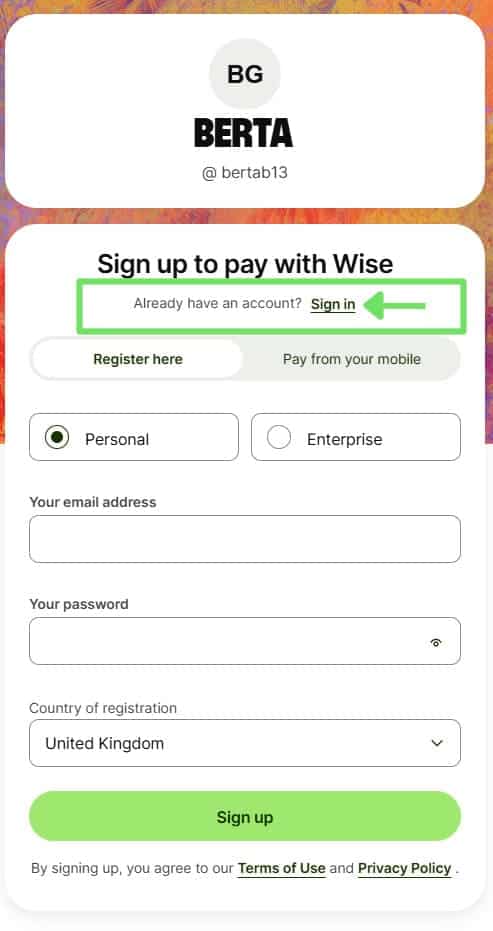
CLICK HERE TO PAY THE 1000 THB DEPOSIT - Wise will show you the screen below. Since you already registered in Step 1, you just need to Sign In. Please ignore the rest of the form.
STEP 3: Send Money
After logging in, you will see your main Wise account screen. Tap the large “Send” button to start the transfer.

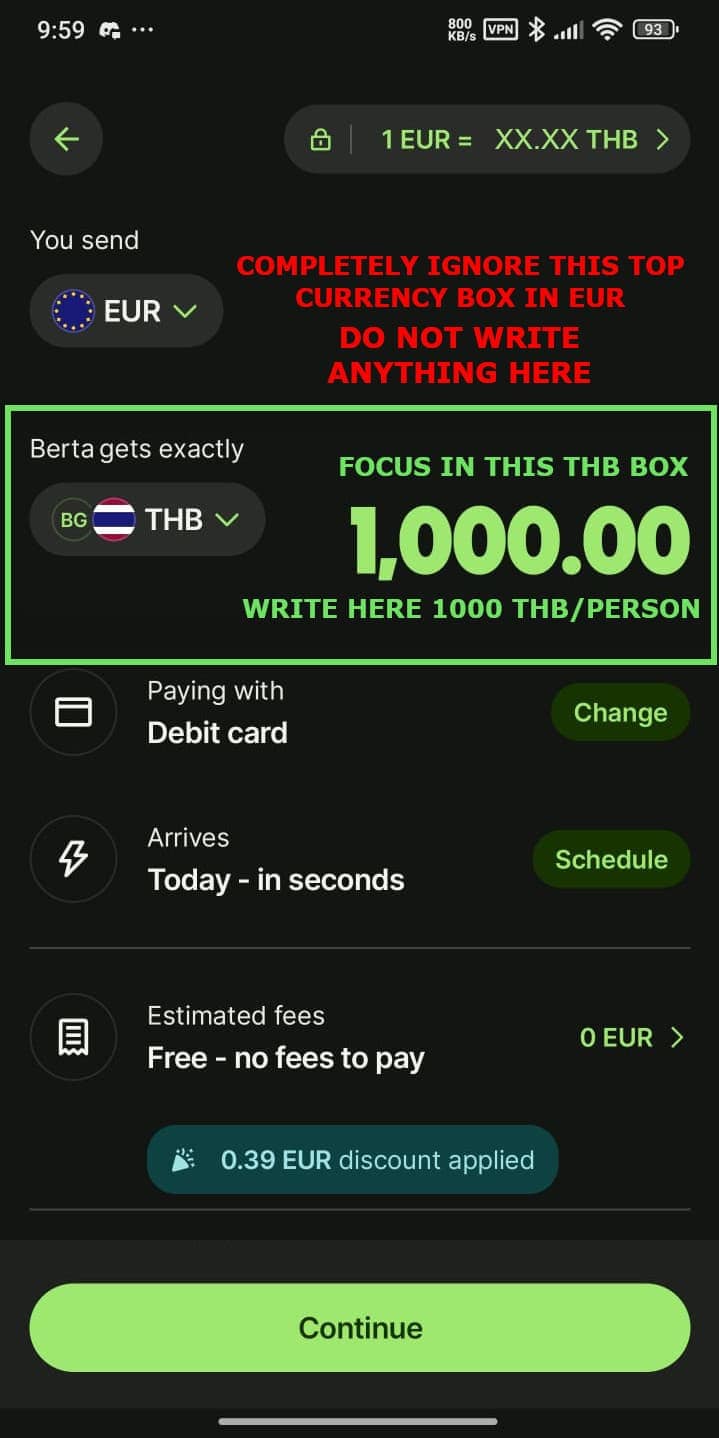
STEP 4: Set the Correct Amount in THB (The Most Important Step!)
This step is crucial to ensure we receive the exact deposit amount. Please follow the instructions in the image carefully:
- COMPLETELY IGNORE the top box (where it shows your currency, like EUR or USD).
- Go DIRECTLY to the bottom box (where it says “Berta gets exactly”).
- Enter the exact amount: 1000 THB per person (e.g., type 2000 for 2 people).
The top box will update automatically. Do not touch it. Once the amount is correct, let’s select the payment method in the next step.
STEP 5: Tap to Change Payment Method
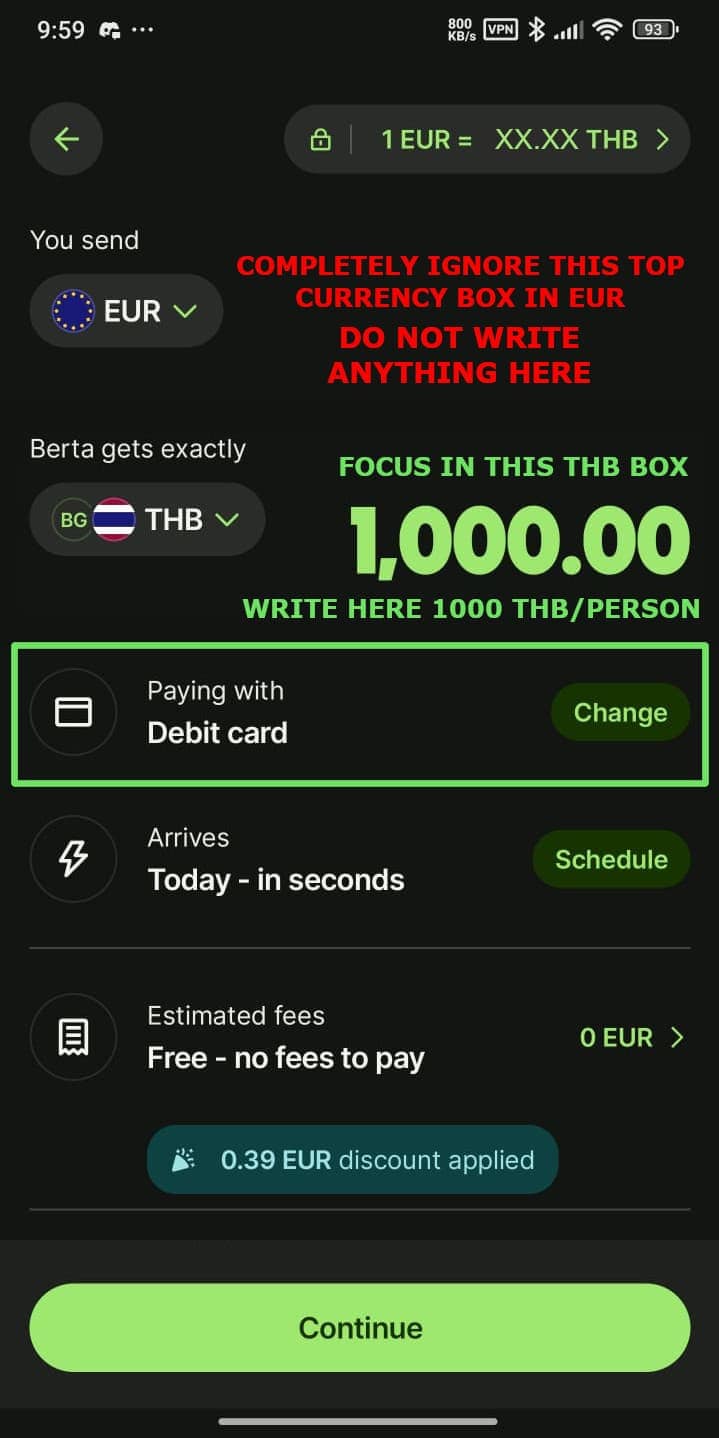
Before you press the final ‘Continue’ button, tap the area highlighted below to see all the available payment options.
STEP 6: Select Payment Method from the List
Wise will now show you this list. We recommend selecting ‘Debit card’ as it’s the quickest and usually free option. After you select it, you will be taken back to the previous screen where you can then press the green ‘Continue’ button.

STEP 7: Choose the Reason for Transfer
For all money transfers to Thailand, Wise is legally required to ask for the reason. Please select ‘Travel expenses’ from the dropdown menu, as shown, and then click the green ‘Continue’ button.

STEP 8: Final Step – Review and Add Your Reference
This is the final confirmation screen. Please check two things before you complete the payment:
- Check the Amount: Make sure the line “Berta gets exactly” shows 1,000 THB per person. This confirms you did Step 4 correctly.
- Add Your WhatsApp Number: This is mandatory for us to identify your payment. In the ‘Reference’ box, please write your full WhatsApp number, including the country code (e.g., +44 123 456 789).

Refund and Cancellation Policy
We understand that travel plans can change. Please read our policy carefully.
Changing Your Date (Rescheduling)
If you are unable to make your scheduled date, you have the option to reschedule. We will hold your deposit and apply it to your new booking, subject to our availability.
Cancellation and Refunds
- ✅ Full Refund: To receive a full refund, you must cancel at least 10 days before your original activity date.
- ❌ Non-Refundable: No refunds will be issued for cancellations made within 10 days of your activity. This also applies to no-shows.